

On this page:
This guide outlines the required actions graduate program staff must complete in Slate to ensure their application is ready to open to applicants for the upcoming admissions cycle. Please complete all sections that apply to your program.
Visit Application Management Portal
If you need assistance at any point, contact [email protected].
Watch a video version of this help guide.
1. Preparation
Attend the Graduate Admissions Kickoff
Attend the annual Graduate Admissions Kickoff meeting
OR
carefully read the kickoff summary message sent by Graduate Admissions.
This ensures you are aware of:
- Policy changes
- Slate updates
- Annual deadlines
- Required compliance items
Review Communication Preferences
Log into Slate and visit the Application Management Portal.
Confirm your communication preferences are set correctly by clicking the button for Manage Communication Preferences.
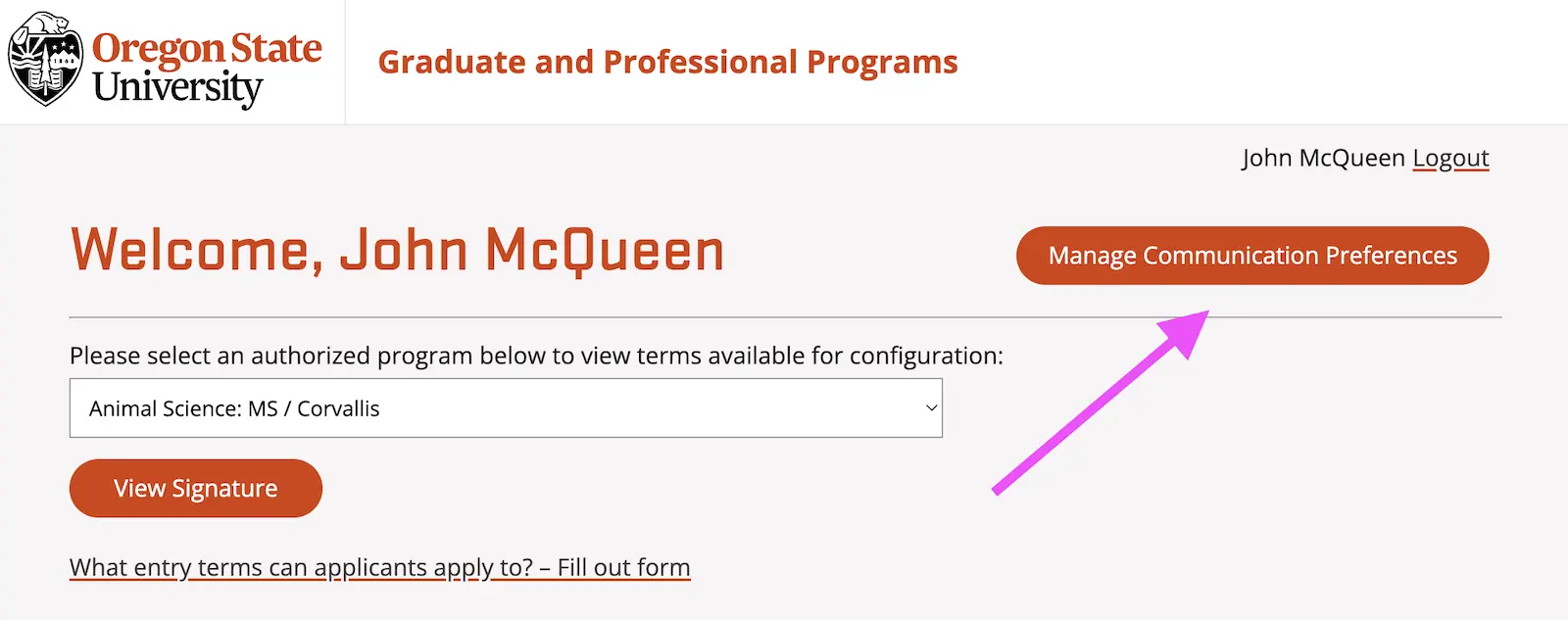
This ensures you receive key application and review communications.
Verify Program Acceptance Notice Signature
Review the decision letter signature for your program. It is listed on the main page of the Application Management Portal.
Confirm:
- The name(s) are current
- Titles are accurate
- Contact information is correct
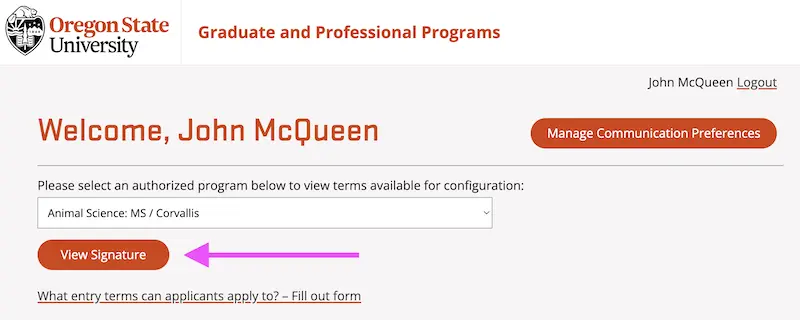
If the information is incorrect, please send an update request to [email protected]. For the signature, include a PNG file with a transparent background no more than 250px wide.
Request Which Terms to Open
Indicate which admission terms your program plans to open (e.g., fall, winter, spring).
To do so, visit the application management portal, pick your program, and click on the link "What entry terms can applicants apply to? - Fill out form".
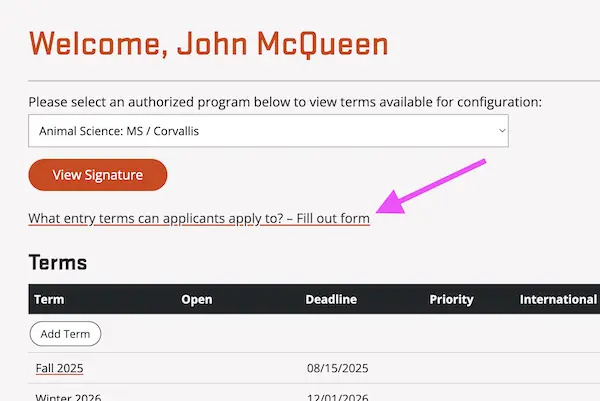
Your application cannot be opened until this information is received.
2. Application Customization
Each section below is a tab on the term in the application management portal. Customize one term and then copy these settings to other terms. Instructions to copy to other terms are given in section three.
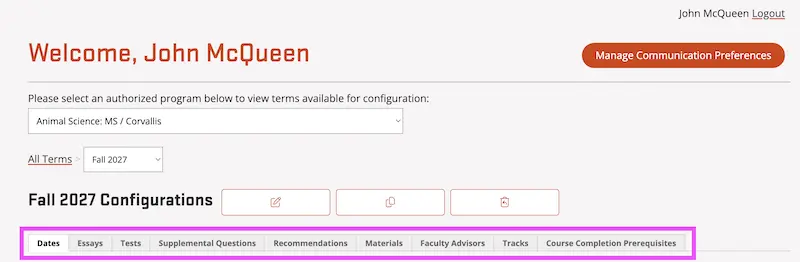
A. Essays
Provide a rank for each essay question. The rank determines the order in which they are shown.
Add min/max word count to limit the length of responses by applicants.
Decide how the personal statement is collected:
- As an essay question, if yes, enter an essay question for it.
- OR as an uploaded document (enable under Materials).
Important:
If you plan to use essay responses as part of an application filter during review, the question may need to live in another section of the application, like tracks or supplemental questions as a multiple-choice question. Contact [email protected] for guidance.
B. Tests
Turn on the GRE or GMAT as required or optional.
C. Supplemental Questions
Enable the questions you want to add to the application.
These questions relate to other tabs in the customization of the application. They must be enabled for the settings on the other tabs to function.
- Advisor ranking
- Prerequisites
- Tracks
Faculty Commitment Statement
Confirm the required faculty/professor commitment statement is displayed if applicable to your program.
Adding New Questions
If you would like to add or modify supplemental questions, please submit a request to [email protected].
D. Recommendations
If your program does not require recommendations:
- Turn OFF “Show Recommendation Page”
If recommendations are required, but you want applications to move to your review bins before recommendations are submitted:
- Set Minimum Submitted for Reader = 0
You can also set custom instructions that are in the application.
E. Materials
Review each requested material (CV, writing sample, etc.). Activate the ones you wish to include in the application.
Consider adding custom instructions for applicants since the default instructions are very limited.
Best practice:
If a document is not needed for application review, consider collecting it after admission instead.
E. Faculty Advisors
Advisor List Maintenance
Please ensure all advisors listed in Slate are currently eligible to advise students. Remove advisors who:
- Have retired
- Left OSU
- Are not accepting students
- Have ended a courtesy appointment
Adding New Advisors
New advisors must be added to Slate before they can be selected in this tab to appear on the application. Please email [email protected] and provide their first name, last name, ONID email address (not first.last), and the major where they hold a graduate faculty appointment.
F. Tracks
If you add tracks, confirm:
- Tracks settings are enabled in the Supplemental Questions tab.
- Track settings are correctly configured.
If you need a track added, please email the request to [email protected]. Programs cannot add a new track on their own but they can add existing tracks to their application.
G. Prerequisites
Confirm all required prerequisites:
- Are listed clearly
- Match current program requirements
- Display correctly in the application
3. Copy to Additional Terms
Required: You must copy settings to all terms for the next two academic year: summer, fall, winter, spring.
Slate does not automatically carry settings forward from one term to the next.
Copy settings from a previous term:
- Visit the term you wish to update
- Click the trashcan icon (replace term configurations)
- Pick the term from where you wish to copy
- Select all parts of the application and click "Replace Settings"

4. Set Application Deadlines
For each term, confirm:
- Final application deadline
- Priority deadline (if applicable)
These dates control application visibility and review timing.
- Summer deadlines should be on or before: May 13, 2027
- Fall deadlines should be on or before: Aug 21, 2027
- Winter deadlines should be on or before: Dec 2, 2027
- Spring deadlines should be on or before: Feb 26, 2028
5. The Checklist
Download a PDF checklist
Before your application opens:
- Preparation
- Review communication preferences
- Verify program acceptance notice signature
- Complete the "Which terms open" form
- Configure questions
- Essays
- Tests
- Supplemental questions
- Recommendations
- Materials
- Advisors
- Tracks
- Prerequisites
- Copy to other terms available (all configurations should be on all the terms: summer 2027, fall 2027, winter 2028, and spring 2028)
- Set deadlines on each term for 2027-28 if not already there
If anything looks incorrect or incomplete, contact: [email protected]
Thank you
Completing this checklist ensures a smooth application experience for applicants and prevents delays during the admissions cycle. Thank you for your partnership!